

Conference room AV installation in Austin
Conference rooms built to work. Every time.Complete conference room AV, video conferencing, structured cabling and network infrastructure for businesses across Austin — designed, installed, configured and tested by one team.Microsoft Teams RoomsZoom RoomsGoogle MeetWebex
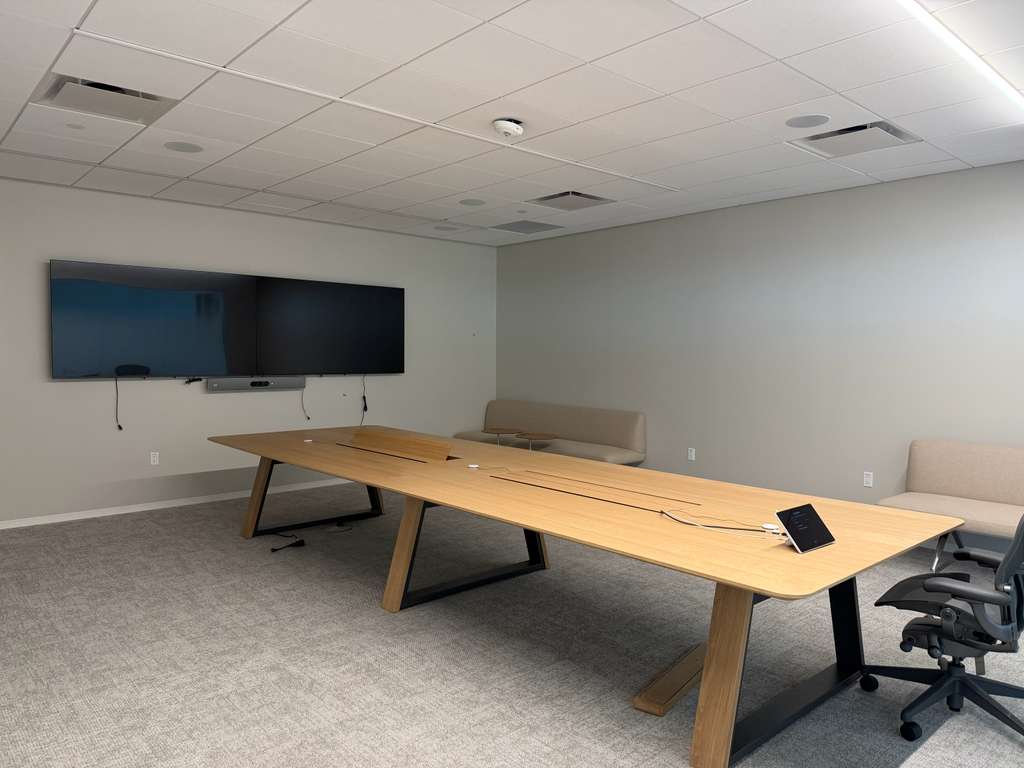
Most conference rooms fail in the first two minutes
The call won't connect, the far end can't hear the table, or nobody can get a laptop on the screen. Here is what we build instead.
The call won't start
One-touch join. The meeting shows up on the table controller; tap it and the room is in.
"Can you hear us?"
Microphones placed and tuned for your table, so the far seat sounds as clear as the near one.
Remote people see half the room
A camera matched to the room's depth and framed so every seat is in the shot.
Nobody can share a screen
Wireless presentation, plus HDMI and USB-C at the table for guests.
Most of these problems are decided before the equipment arrives — by cable routes, network settings and where the camera goes. That is why we do all of it.
One team. Complete conference room.
As an Austin conference room AV integrator, we handle every layer of the room ourselves — one number to call, no handoffs between vendors.
- 01
Design
We walk the room, measure it and confirm your platform. Display size and camera, microphone and speaker positions are set before anything is ordered.
- 02
Cabling
Cat6/6A to the display wall, table and ceiling, with floor boxes where the room needs them. Every run certified and labeled.
- 03
Network
Switch ports, PoE and the network settings Teams or Zoom need, set up with your IT team.
- 04
AV Equipment
Displays, video bar or PTZ camera, microphones, speakers and touch controller, specified for the room size.
- 05
Installation
Solid mounts, concealed cabling, clean credenza and table work.
- 06
Configuration
Room account, calendar, controller and wireless sharing set up on your platform.
- 07
Testing
A live test call from every seat: audio, camera framing and content sharing, signed off with you in the room.
- 08
Support
We stay reachable after the first meeting — for changes, new rooms and anything that stops working.
The same standard covers the rest of the floor — commercial AV installation and structured cabling in Austin.
Everything the room needs, installed as one system
Conference room displays
Commercial displays sized to the farthest seat, mounted level, cabled out of sight.
Video bars
All-in-one camera, microphones and speakers for huddle and mid-size rooms.
PTZ cameras
Pan-tilt-zoom cameras with speaker framing for boardrooms and long tables.
Conference room microphones
Table, pendant or ceiling microphones, so every seat is picked up.
Speakers
In-ceiling or wall speakers where a video bar alone won't fill the room.
Touch controllers
A tabletop panel to join, share and end a meeting in one tap.
Wireless presentation
Share from any laptop or phone without a cable.
HDMI & USB-C connectivity
Table boxes for guests who would rather plug in.
Room scheduling panels
A screen by the door showing who has the room and until when.
Structured cabling
Certified Cat6/6A to every device, labeled at both ends.
Network & PoE
Ports, power and bandwidth for every device in the room.
Cable management
Floor boxes, conduit and concealed runs: nothing on show but the screen.
Video conferencing installation for the platform you already use
Microsoft Teams Rooms installation
Teams Rooms on Windows or Android with a touch controller, room account and calendar, so meetings appear on the panel and start with one tap.
Zoom Rooms installation
Zoom Rooms hardware with a controller and a scheduling display at the door.
Google Meet rooms
Meet hardware tied to Google Calendar, for teams on Google Workspace.
Webex rooms
Cisco room devices for teams on Webex.
Bring your own device
Any laptop connects with one USB-C cable and uses the room's camera, microphones and speakers — for teams that switch platforms from call to call.
Sized to the room, not the catalog
Office conference room technology should match how many people sit at the table and how the room is used. These are typical starting points — the walkthrough sets the final design.
Huddle rooms
One 55–65″ display, an all-in-one video bar, a touch controller and wireless sharing.
Meeting room AV
A 65–86″ display or two displays, a video bar or camera with extra microphones, a table connectivity box and a scheduling panel.
Boardroom AV installation
Two displays or one large-format screen, PTZ cameras, ceiling or table microphones with audio processing, in-ceiling speakers and floor boxes.
Training & multipurpose rooms
Projector or video wall, a presenter camera, wireless microphones and room audio.
Conference rooms we've built in Austin
Boardrooms, meeting rooms and huddle spaces across Austin. Every photo is our own install.
More of the same crews and the same standard across our recent work.
Built for the way Austin offices work
Offices & headquarters
New suites and refreshes, from one huddle room to every room on the floor, built to one standard so they all work the same way.
Coworking & flex workspace
Bookable rooms any member can walk into and start a call, with scheduling panels at the door.
Professional services
Law, finance and consulting boardrooms where client calls have to sound right the first time.
Occupied offices
Upgrades installed after hours or room by room, so meetings keep running.
Working with a GC, architect, interior designer or furniture dealer? We coordinate cable paths, wall blocking and power with them early, so the room is ready before the furniture arrives.
- One contract, one teamCabling, network and AV under one scope.
- Every run certifiedTested to TIA standard and labeled at both ends.
- Tested with a live callFrom every seat, before we hand over the room.
- Local to AustinBased here, on site fast across the metro.
Conference room questions
How much does conference room AV installation cost in Austin?
It depends on room size, platform and how much cabling the room needs. The biggest cost drivers are display size, microphone type and whether the room needs new cabling. After the walkthrough you get a fixed, itemized quote.
Do you install Microsoft Teams Rooms and Zoom Rooms?
Yes. We install and configure Teams Rooms, Zoom Rooms, Google Meet and Webex rooms — hardware, room account, calendar and controller — so the room joins meetings with one tap. You provide the platform license; we set up the rest with your IT team.
Can you reuse the equipment we already have?
Often, yes. At the walkthrough we check what you own against your platform's requirements and the room size, and replace only what won't work reliably.
How long does a conference room installation take?
A single room with existing cabling is usually installed in a day. New cabling, several rooms or construction work add time; the walkthrough turns that into a schedule.
Do you run the cabling and network too, or only the AV?
Both. Conference room structured cabling, network ports, PoE and the AV are one scope. When they are separate vendors, every fault becomes a question of whose fault it is.
Can you install in an office that's in use?
Yes. We schedule around your meetings — after hours or room by room — and leave each room working at the end of every visit.
Which video bar or camera is right for our room?
It depends on room depth and seat count. All-in-one video bars cover most huddle and mid-size rooms; long tables and boardrooms usually need a PTZ camera and separate microphones. We recommend hardware certified for your platform.
Do you support the room after installation?
Yes. We stay available for changes, updates and new rooms, and every install comes with documentation: device list, cable labels and network details.
Planning a new conference room — or fixing one that doesn't work?
Send us the floor plan or a few photos of the room. We'll come back with a design and a fixed quote.
Get a Conference Room Quoteor call (737) 398-8544